What Is a VPS for AI, and What Can It Actually Do?
A VPS isn't an AI machine, it's just a computer that stays on 24/7. Here's what genuinely runs on a plain GPU-less VPS, what needs a GPU, the specs and monthly cost, plus when you actually don't need a VPS at all.
This question comes up almost every month, usually from someone who's just getting serious about using AI in their business: "to get it running on its own, I need to rent a VPS, right? What specs? Do I need a GPU?"
The answer usually surprises people, because both assumptions are off. The first assumes a VPS is some kind of "AI machine" that becomes smart the moment you rent it. The second assumes you have to rent an expensive GPU right away to get AI running. But for most business needs, even the cheapest VPS is already enough, and the model gets called from somewhere else.
In this article I'll separate three things: what a VPS is, what's realistic to run on it for AI purposes, and when you actually don't need a VPS at all.
A VPS is just a computer that never gets turned off
Picture a regular computer, but kept in a data center, with a fast internet connection, power that never goes out, and access from anywhere. You have full access to the system, so you can install anything on it. That's a VPS.
How it differs from the others:
- Regular hosting is just for putting up a website. You can't install your own app that runs continuously.
- A VPS gives you a full operating system, usually Linux, that you can fill with any app, running 24/7.
- Cloud GPU is a rented computer with a heavy-duty graphics card, billed hourly, used when you're actually running or training your own model.
The term "VPS for AI" usually means the middle one: a place to host the system that connects AI to everyday work.
What stays on 24/7 is the workflow, not the model
This is the part that gets mixed up the most. In nearly every AI system I've built for clients, the model itself does not live on the client's server. The model is called through an API when needed, then stops. What actually has to stay on is the unglamorous part: the incoming message receiver, the scheduler, the task queue, and the database.
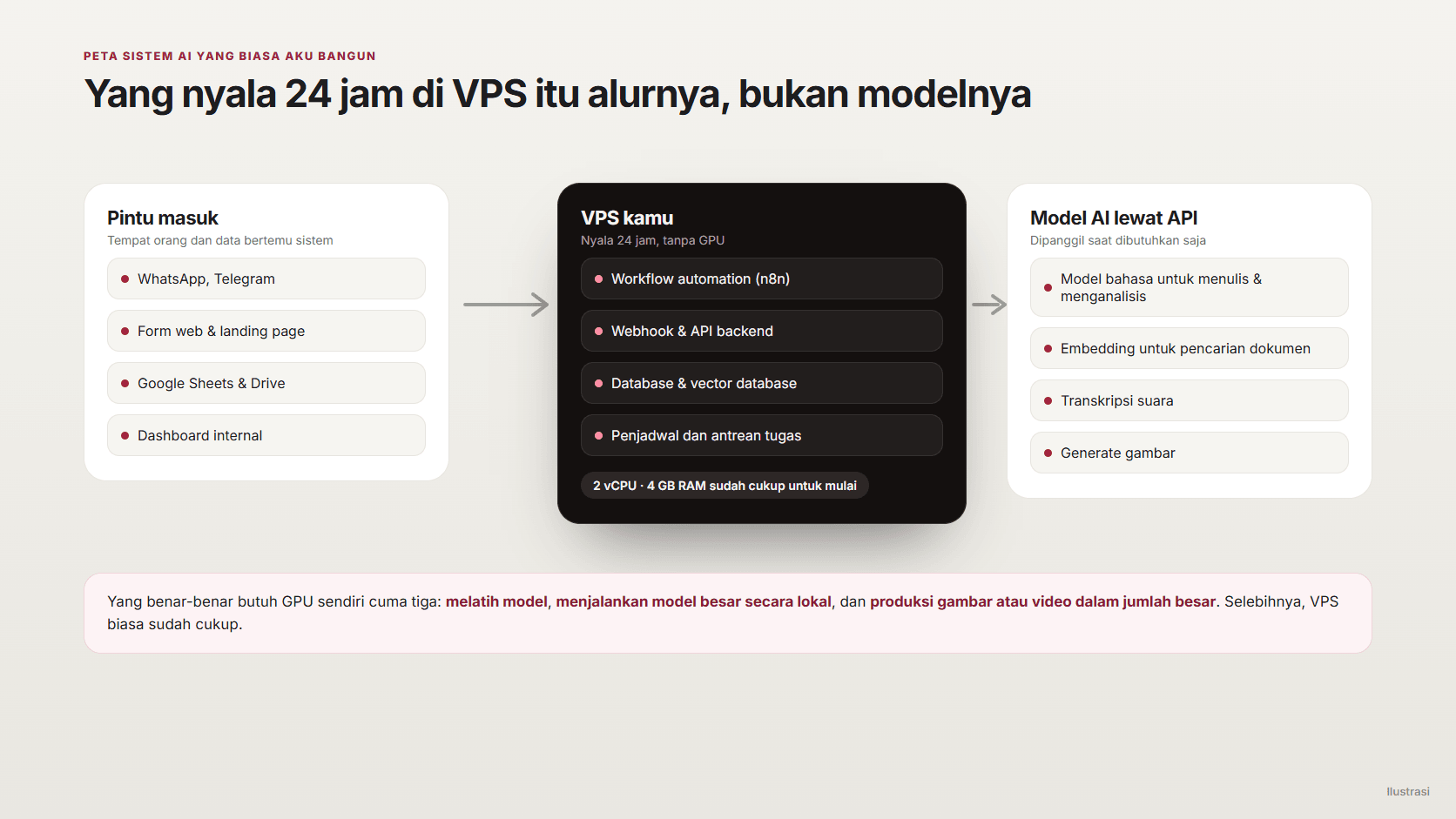
The upside is good for your wallet: since the VPS only handles the flow, the specs it needs are small, and the model cost is billed per use.
What can run on a plain VPS, without a GPU
This is a list of things I actually use on real projects, not a theoretical list:
| Need | What runs on the VPS | A reasonable minimum spec |
|---|---|---|
| Workflow automation | n8n, workers, cron scheduler | 2 vCPU, 4 GB RAM |
| WhatsApp or Telegram bot | Webhook receiver, reply queue | 1 to 2 vCPU, 2 GB RAM |
| Internal document search (RAG) | Vector database, document chunks, embeddings via API | 2 vCPU, 4 GB RAM, ample disk |
| Daily automated reports | Data-pulling script, scheduler, email sender | 1 vCPU, 2 GB RAM |
| Document pipeline | OCR, PDF splitter, Drive upload queue | 2 vCPU, 4 GB RAM |
| Internal dashboard | Web app, database, chart renderer | 2 vCPU, 4 GB RAM |
| Small model for light tasks | Classification, local embeddings, short-text summarizing | 4 vCPU, 8 GB RAM |
The pattern that emerges: almost every need tops out at 2 vCPU and 4 GB RAM, and what usually drives it up isn't the AI, it's the queue volume and the database size.
As a price benchmark in Indonesia, Biznet Gio's official pricing as of September 2026 puts a 1 vCPU, 1 GB RAM VPS at Rp59,000 (about US$3.60) a month, 2 vCPU and 4 GB RAM at Rp139,000 (about US$8.40), and 4 vCPU and 8 GB RAM at Rp269,000 (about US$16.30, promo price, normally Rp399,000). A server in Indonesia also means lower latency for local users and billing in rupiah.
On running your own AI model on a VPS
This is the most common question: "if I install an open source model on my VPS, I don't need to pay for an API anymore, right?"
You can, but you need realistic expectations. Without a GPU, model speed is limited by RAM speed, not core count. From various community benchmarks in 2026, small models in the 3 to 8 billion parameter range, compressed, run at roughly 10 to 20-something words per second on a modern server CPU. Enough for work running in the background, but it feels slow for a chat used by many people at once.
The practical rule is simple: the model file's size, plus room for context, has to fit in RAM. A compressed 3B model needs around 2 GB, an 8B model around 5 GB. So an 8 GB RAM VPS is the comfortable ceiling for a small model, not a large one.
What I think makes sense to run locally:
- Embeddings for document search. Lightweight, always running, and the data never leaves your server.
- Classification and filtering. For example sorting incoming messages before passing them to a bigger model.
- Overnight batch work. Summarizing hundreds of documents is fine even if it's slow.
- Data that can't leave. Compliance reasons often matter more than speed.
What should still go through an API: long reasoning, polished writing, and anything a person is waiting on in front of the screen.
What genuinely needs a GPU
There are three jobs that genuinely can't be forced onto a plain VPS:
- Training or fine-tuning a model.
- Running a large model locally, for example in the 70 billion parameter class or above.
- Producing images or video in bulk with a self-hosted model.
For these, renting a GPU by the hour makes more sense than buying one. For reference, RunPod's pricing as of September 13, 2026 lists the RTX A5000 with 24 GB VRAM starting at US$0.16 per hour, the RTX 4090 at US$0.34 per hour, the A100 80 GB at US$1.19 per hour, and the H100 at US$1.99 per hour on the community cloud.
It looks cheap, until you leave it running nonstop:
Monthly cost, if left running 24 hours a day for a full month(rupiah per month)
- VPS 2 vCPU / 4 GBRp139,000
- VPS 4 vCPU / 8 GBRp269,000
- GPU 24 GB (RTX A5000)±Rp1.9 million
- GPU 80 GB (A100)±Rp14.1 million
That's why the common pattern isn't leaving a GPU on continuously, but turning it on only when there's heavy work, then shutting it back down. And for most businesses, calling a model through an API still ends up cheaper than managing your own GPU.
If you're getting started, here's what I set up first
Not a full server-admin checklist, but here's the bare minimum before the system goes into use:
- Pick a server location close to your users. For users in Indonesia, a Jakarta or Singapore server makes a noticeable difference.
- Use Ubuntu LTS and Docker. Every app runs as a container, so moving servers later is just copying the configuration.
- Disable password login, use an SSH key. This is the first line of defense, and the one most often skipped.
- Turn on the firewall. Open only the ports you use, usually 22, 80, and 443.
- Set up a domain and HTTPS. WhatsApp webhooks and other services generally reject an address without HTTPS.
- Keep API keys in an environment file, not in the code. And never let them get committed to the repository.
- Turn on automatic snapshots. At Biznet Gio, snapshots are billed per GB per month and cheap compared to losing data.
- Set up uptime monitoring. If a container dies at 2 a.m., you need to know before your client tells you.
- Track the monthly cost. A VPS is a subscription. If the project stops, the server should get shut down too.
When you actually don't need a VPS
This is the part VPS providers rarely write about. A lot of the systems I've built for clients actually run without a VPS at all:
- Google Apps Script and Sheets. The co-living finance system with automatic WhatsApp reminders I worked on runs entirely there: the database, scheduler, and message sender all live inside the Google ecosystem, with not a single rented server.
- Serverless platforms for websites and light APIs. Pay only when there's traffic, no server to manage.
- Cloud-hosted automation services, like n8n cloud. More expensive per month, but no updates or backups to manage.
The rule I use: a VPS only makes sense once you need something that has to stay alive continuously, needs full control, or needs to store data somewhere you decide yourself. If the job only runs once a day and the data's already in Google, you often don't need an extra server.
Wrapping up
So if asked "what can a VPS for AI actually do," the honest answer is: it can run almost every part that makes AI useful in a business, except the heavy model part itself. And that part happens to be the easiest one to rent per use.
My suggestion: start from a different question. What process do you want to run automatically, and how often. From there you'll know whether you need a VPS or not, and if you do, the spec is usually much smaller than you'd think. On sorting out what's worth automating, I cover it in Not Everything Needs AI.
Is your team still doing something by hand?
Tell me about it, and let's find the fix together.
More notes

Can AI Learn Your Sales Style From WhatsApp Chat History?
Yes, and you usually don't need to train your own model. How to export WhatsApp chats, turn them into a style guide, a ready-to-use prompt, and the customer data risks.
Read the note
Gemini vs ChatGPT for Office Work, Which One Fits Better?
Gemini and ChatGPT can both be used for work, but their strengths differ. A plan price comparison in Rupiah, which suits teams on Google Workspace, and when ChatGPT makes more sense.
Read the note