Making a LinkedIn Profile Photo With AI: 5 Prompts That Worked First Try
One ordinary studio photo, five prompts, five different LinkedIn profile styles. Here's the prompt structure that keeps the face intact, the full prompts, and the limits no prompt can fix.
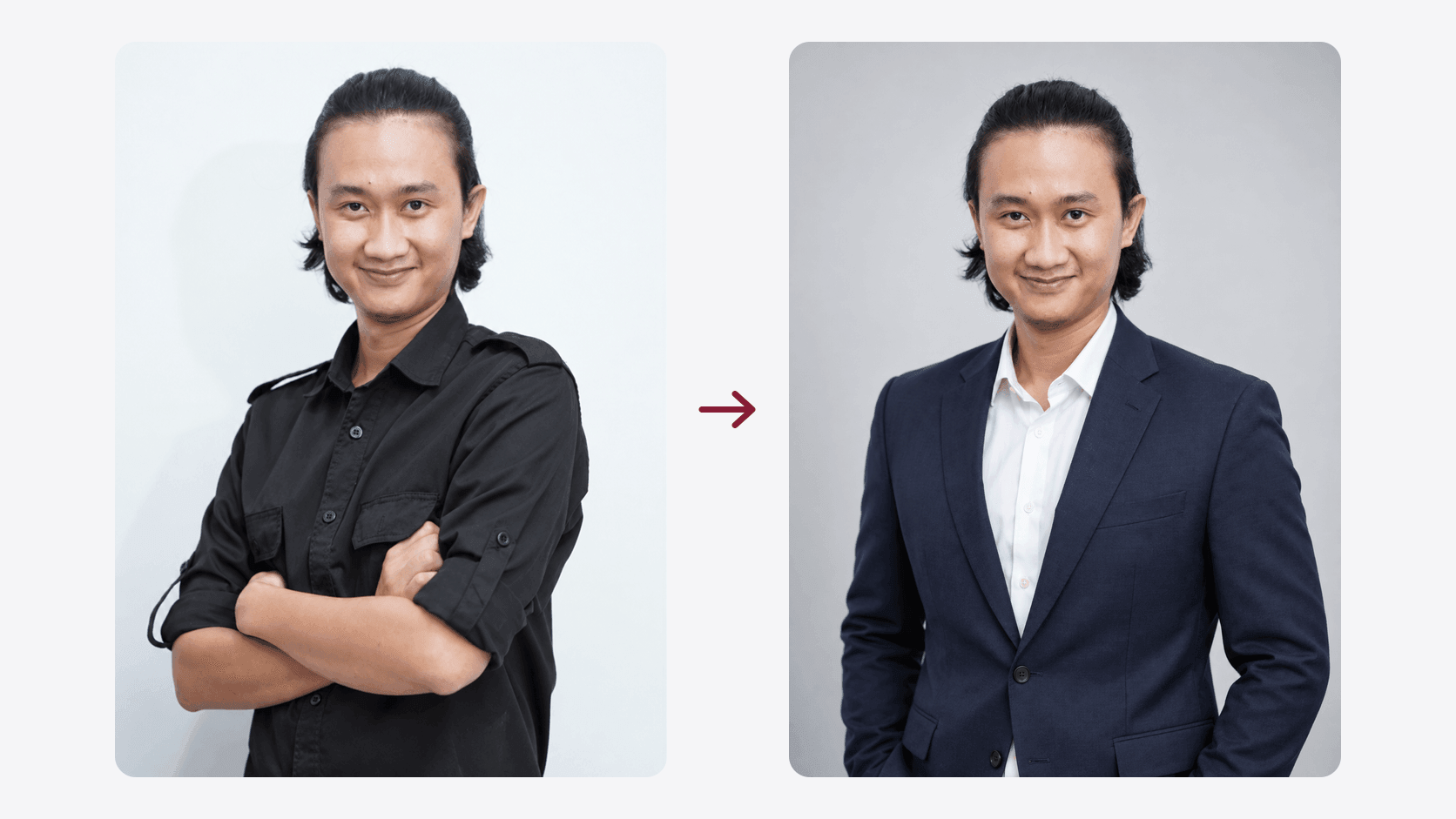
I only have one LinkedIn profile photo: a studio shot on a white background, black shirt, arms crossed. It's fine, but it's one look. Every time I needed something different, whether for a client profile, a deck, or a bio on another platform, the only option was to book another shoot.
So I tried something else: use that one photo as a reference, then run five different prompts to produce five professional styles. The result was five photos, all of them generated on the first try, with no prompt revisions at all.
This article covers the prompt structure that keeps the face from changing, the five full prompts you can copy, and the part that rarely gets discussed: what no amount of prompting can fix, plus where LinkedIn itself stands on AI profile photos.
- The reference behind all five results, an ordinary studio shot
- 1 photo
- One prompt per style, from corporate to founder
- 5 styles
- Every result here came out on the first attempt, no prompt revisions
- 1 try
What I used
The model is gpt-image-2.5-sunburst through the OpenAI Playground, with one reference photo uploaded in each session. According to OpenAI's image generation guide, this model is positioned for "workflows where editing precision matters most", while gpt-image-2.5-flare is meant for fast everyday generation. Precision is what matters here, because the person's face has to stay readable as the same person.
Here's the reference photo, with no special preparation:
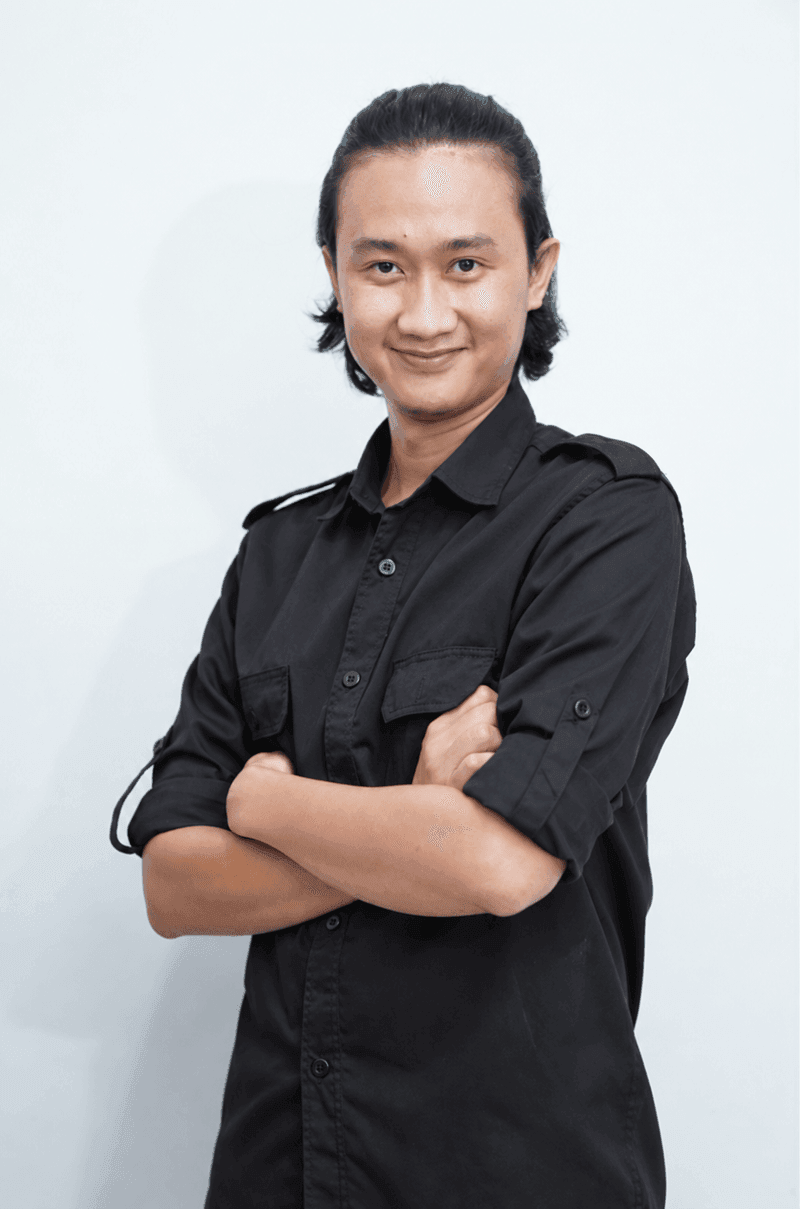
Two things make this a good reference: the lighting is even, so no part of the face falls into deep shadow, and the face is turned toward the camera. Photos with dramatic lighting or an extreme head turn are harder, because the model has to guess at the parts it can't see.
The anatomy of a prompt that keeps the face intact
All five prompts here use the exact same skeleton. Only the contents change. The order is deliberate, because the most important instruction goes first:
- 1Lock the identityName the uploaded photo as the reference, then list what must be preserved
- 2Subject and wardrobeWho they are and what they're wearing, as specific as possible
- 3Scene and expressionLocation, posture, eye direction, smile
- 4Camera and lightLens, depth of field, the character of the lighting
- 5Framing and limitsAspect ratio, body crop, then a list of what must not appear
The first block does most of the work. This is the one I use, unchanged across all five prompts:
Use the uploaded photo as the exact identity reference. Preserve the person's
facial identity, facial proportions, hairstyle, skin tone, and distinctive
natural features. The result must clearly look like the same person.
The key isn't the sentence "don't change the face", it's naming each thing that has to survive: facial proportions, hairstyle, skin tone, distinctive features. The more explicit that list, the less room the model has to "improve" a face toward the average of its training data.
The last block does the opposite job. It doesn't add anything, it closes doors:
VERTICAL PORTRAIT, 3:4 ASPECT RATIO. Waist-up framing, centered subject,
comfortable negative space around the subject, natural headroom.

No text, no logo, no excessive retouching, no artificial facial modifications.
no excessive retouching and no artificial facial modifications are the two I kept forgetting early on, and the difference shows: without them, the result drifts toward a version of the face that's too smooth and too symmetrical.
I write the prompts in English, not because another language wouldn't work, but because the photography vocabulary (85mm, shallow depth of field, waist-up) lives in English and reads more consistently to the model. On turning a visual reference into a written prompt, I cover that separately in How to Get an AI Image Prompt From a Reference.
The five prompts and their results
Swap the wardrobe and the location if you want a different look. Every prompt below is ready to copy.
1. Clean Corporate
The safest and most neutral one. A plain gray studio background, so the only thing to look at is the face. This is what I'd pick if the photo has to work across a lot of contexts at once.
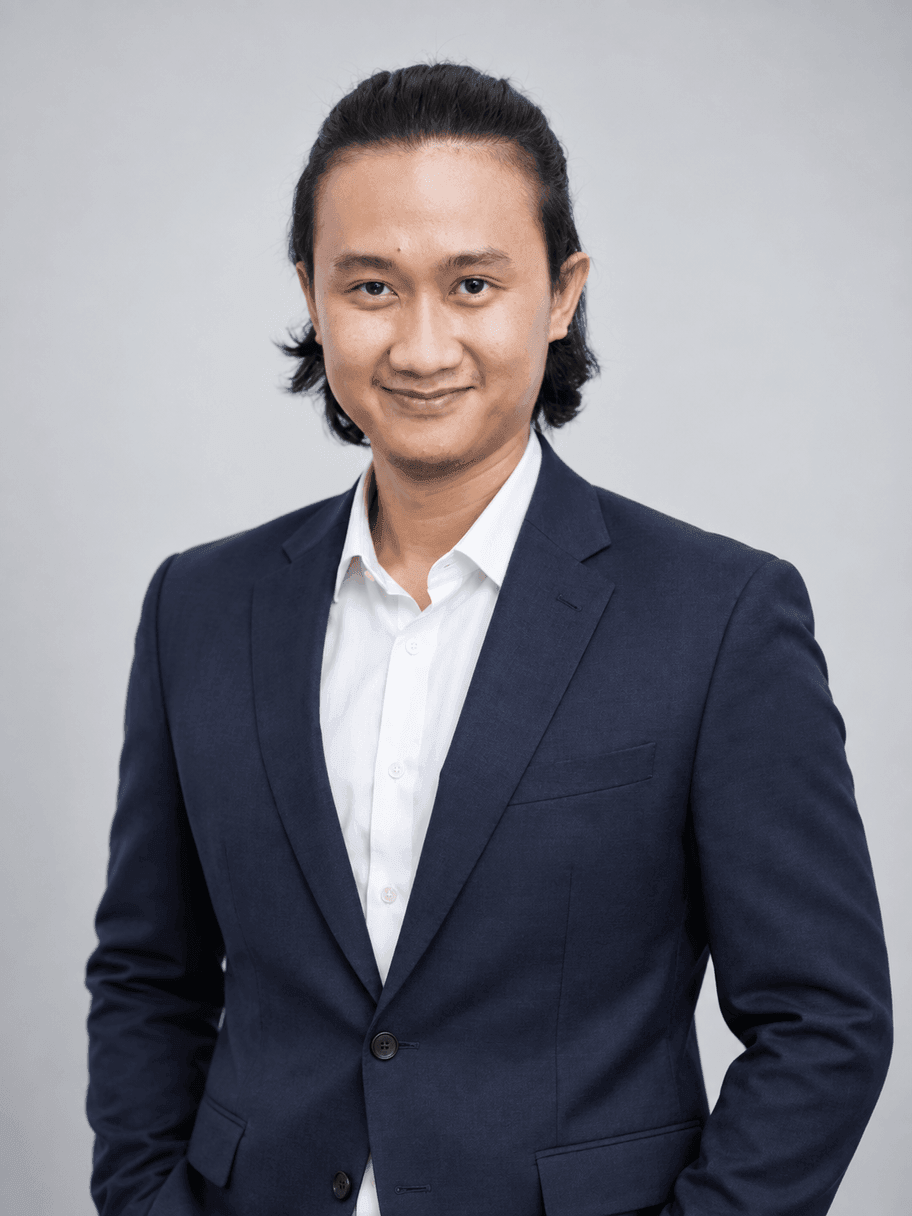
Use the uploaded photo as the primary identity reference. Preserve the person's exact facial identity, facial proportions, hairstyle, skin tone, and distinctive natural features. The result must clearly look like the same person.

Create a premium professional LinkedIn portrait of the same person, framed from approximately the waist up. He is wearing a well-fitted dark navy blazer over a clean white shirt. Relaxed upright posture, shoulders naturally positioned, confident and approachable expression with a subtle natural smile, looking directly at the camera.

Clean light gray studio background, soft professional studio lighting, realistic skin texture, natural facial details, subtle shadows, premium corporate photography, 85mm portrait lens, shallow depth of field.

VERTICAL PORTRAIT COMPOSITION, 3:4 ASPECT RATIO. Show the person from the waist up with enough headroom and comfortable space around the body. Centered professional composition.

Modern, trustworthy, authentic LinkedIn profile photography. No text, no logo, no excessive skin retouching, no facial alteration.
2. AI & Automation Consultant
The one I use myself, because it's closest to the work I actually do. Charcoal blazer, plain black shirt, a blurred technology office behind. The important line in this prompt is no futuristic holograms. Without it, the word "AI" in a prompt often gets translated into tacky sci-fi props.
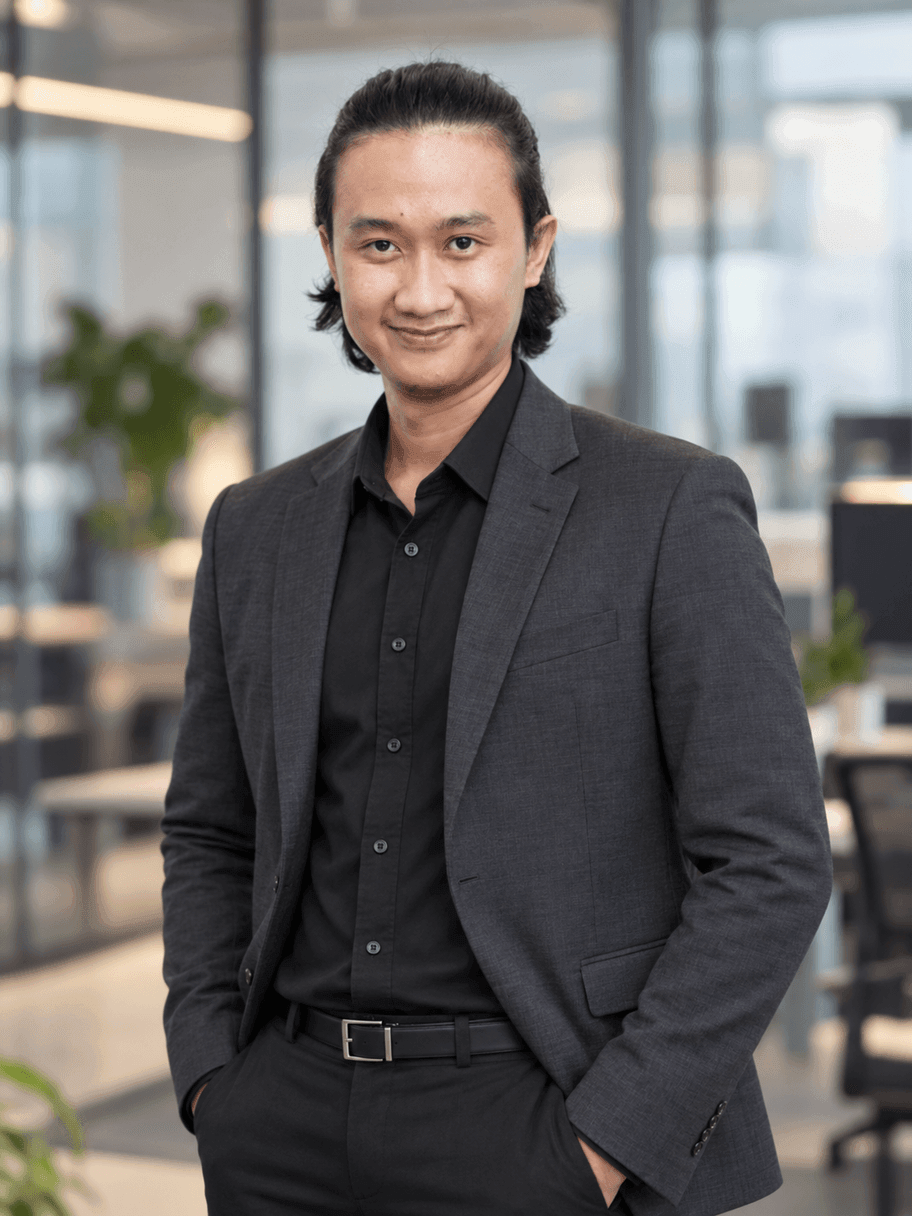
Use the uploaded photo as the exact identity reference. Preserve the person's recognizable face, facial proportions, hairstyle, skin tone, and natural characteristics. Do not change the person's identity.

Create a premium LinkedIn personal branding portrait of the same person, framed from the waist up. He is an AI and automation consultant wearing a sophisticated charcoal blazer over a premium plain black shirt.

He stands naturally in a modern minimalist technology office, with subtle glass architecture and workspace elements softly blurred in the background. Calm, confident and approachable expression, subtle natural smile, direct eye contact with the camera. Natural professional body language, hands positioned casually and naturally.

Natural cinematic office lighting, realistic skin texture, premium editorial business photography, 85mm lens, shallow depth of field, sophisticated modern technology consultant aesthetic.

VERTICAL PORTRAIT, 3:4 ASPECT RATIO. Waist-up framing, centered subject, balanced negative space above and beside the subject.

Professional yet contemporary, intelligent, approachable and credible. No futuristic holograms, no text, no logo, no excessive retouching.
3. Creative Agency
A dark blazer with a plain t-shirt underneath. One step more relaxed than the first, but still tidy. A good fit if you're in a creative field where a full suit reads as stiff.
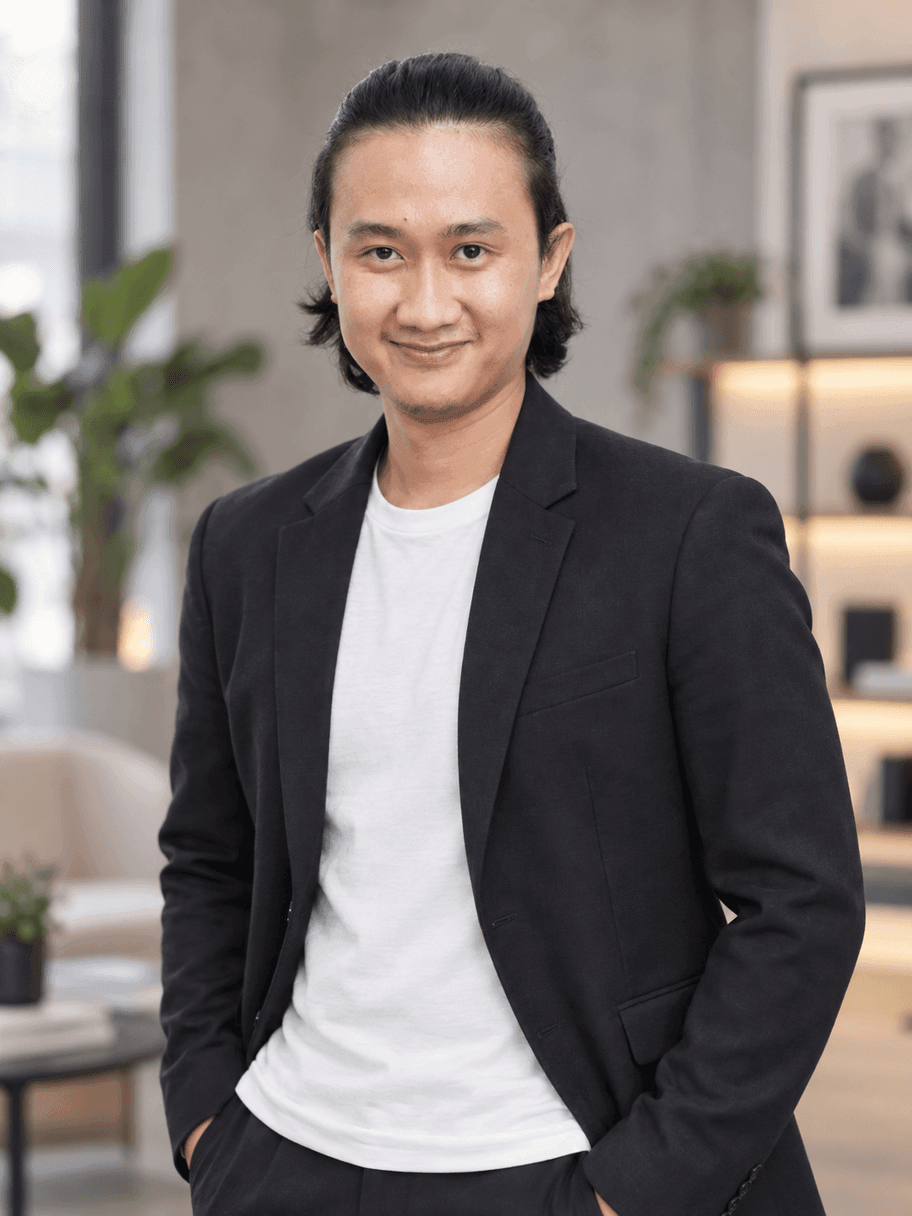
Use the uploaded photo as the primary identity reference. Keep the person's exact facial identity and recognizable characteristics unchanged.

Create a premium modern LinkedIn personal branding portrait of the same person, framed from the waist up. He wears a dark tailored blazer with a high-quality plain t-shirt underneath.

Relaxed natural posture, confident but friendly expression, subtle genuine smile, direct eye contact. Background is a stylish modern creative studio with minimalist furniture and architectural elements, softly blurred.

Professional editorial photography, natural soft lighting, realistic skin texture, sophisticated neutral tones, 85mm lens, shallow depth of field, premium creative-agency aesthetic.

VERTICAL 3:4 PORTRAIT. Half-body / waist-up composition with enough space around the subject, natural headroom, centered framing.

Authentic, modern, confident and approachable. No text, no logo, no excessive beauty retouching.
4. Executive Consultant
The most formal of the five: a charcoal suit with a black shirt, no tie, in a high-end office. I'd use this when the audience is board level, or the material leans toward a corporate proposal.
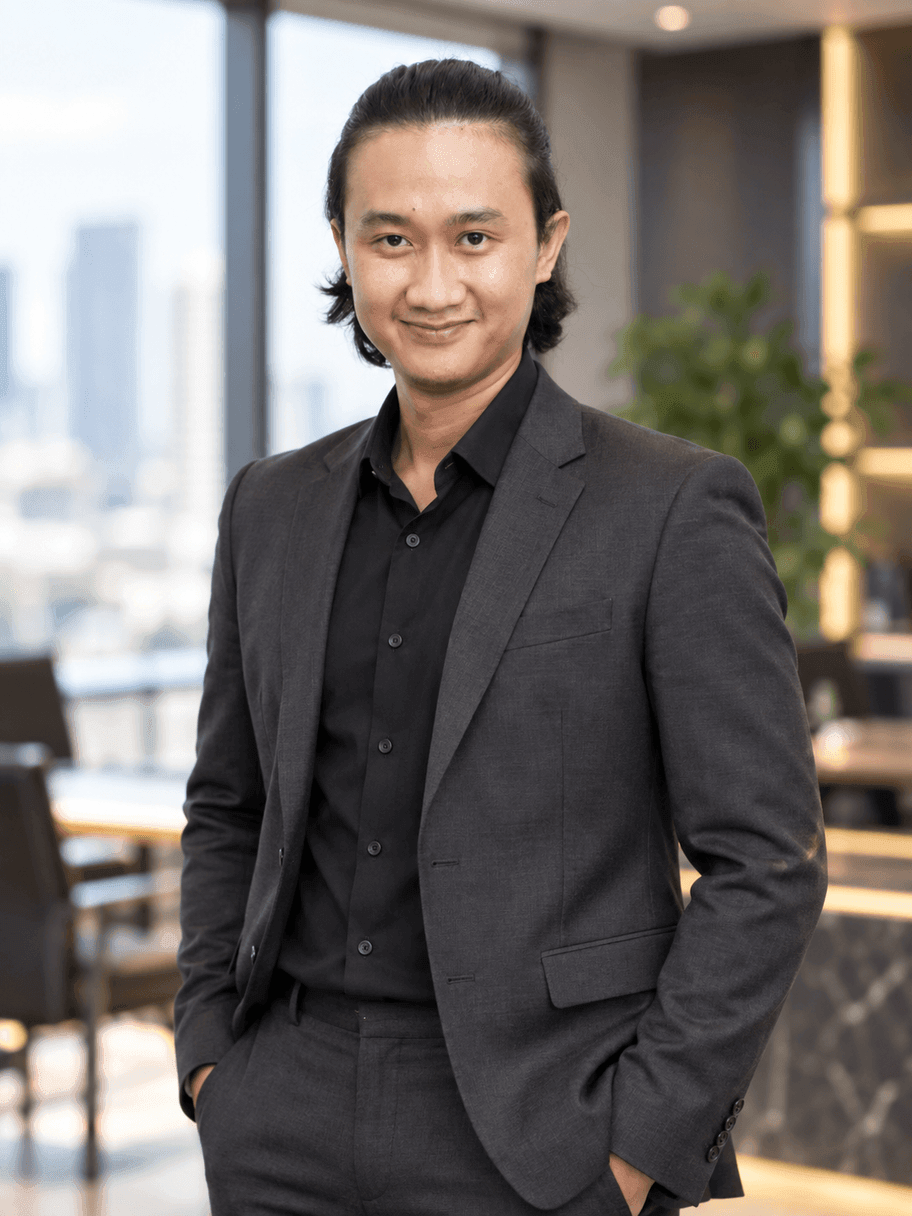
Use the uploaded photo as the exact identity reference. Preserve the person's facial identity, facial structure, hairstyle, skin tone, proportions, and distinctive features.

Create a high-end professional LinkedIn portrait of the same person, framed from approximately the waist up. He wears a tailored charcoal suit with a clean black shirt, no tie.

Standing confidently in a premium modern office with elegant architectural details softly blurred behind him. Natural upright posture, shoulders relaxed, hands positioned naturally, calm confident expression and subtle professional smile.

Elegant professional lighting, realistic skin texture, natural facial details, premium executive editorial photography, 85mm portrait lens, shallow depth of field.

VERTICAL PORTRAIT, 3:4 ASPECT RATIO. Waist-up framing, balanced composition, comfortable negative space around the subject, natural headroom.

Sophisticated, modern, credible and approachable. Avoid overly stiff corporate posing. No text, no logo, no artificial facial modifications.
5. Founder / Personal Brand
The most casual one. A dark overshirt over a plain tee, in a workspace with a laptop in it. The lens is deliberately dropped to 50mm instead of 85mm, so more of the background stays visible and it reads as a lifestyle shot rather than a studio one.
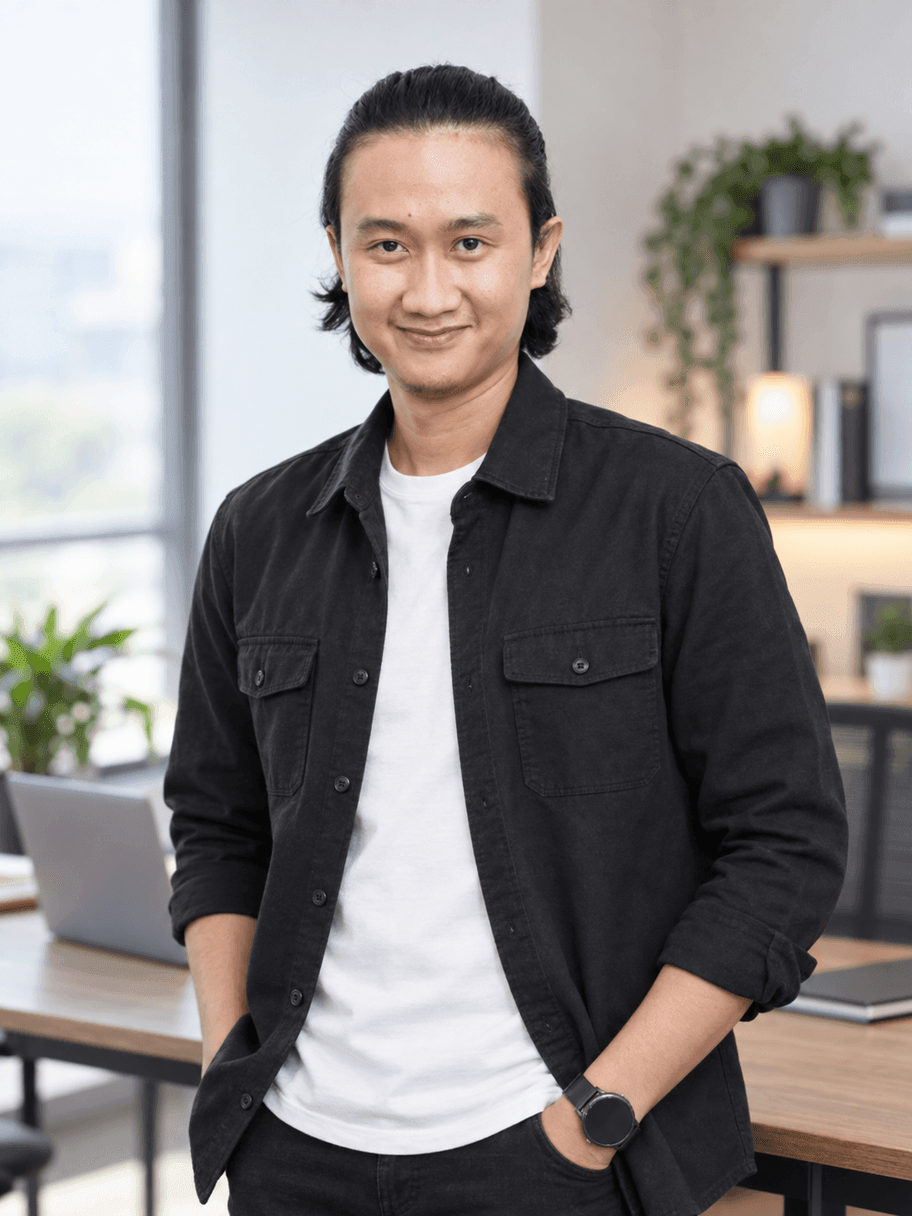
Use the uploaded photo as the exact identity reference. The person must remain clearly recognizable and consistent with the reference photo. Preserve facial identity, facial proportions, hairstyle, skin tone, and natural distinctive features.

Create a premium LinkedIn personal branding photo of the same person, framed from the waist up. He wears a sophisticated dark overshirt over a clean premium plain t-shirt.

He is standing casually in a modern minimalist workspace, with a laptop and subtle office elements visible in the softly blurred background. Relaxed posture, natural hand position, genuine subtle smile, confident and approachable expression, direct eye contact.

Soft natural window lighting combined with professional fill lighting, realistic skin texture, premium lifestyle business photography, 50mm lens, shallow depth of field.

VERTICAL PORTRAIT, 3:4 ASPECT RATIO. Waist-up composition, centered subject, natural headroom and comfortable space around the body.

Authentic modern entrepreneur and technology consultant aesthetic, professional without looking overly corporate. No text, no logo, no excessive retouching, no artificial-looking face.
What no prompt can fix
All five results came out on the first try, and that isn't entirely good news. It means the model is consistent, but it also means I never got to see how much it varies on a second run.
Compare the original photo with the results carefully and the pattern shows. The identity holds: eye shape, brows, hair, jawline, still the same person. What shifts are the small things that make a photo feel real:
- The skin comes out cleaner than it actually is, even with
realistic skin textureandno excessive retouchingin the prompt. That's a built-in tendency of the model, not a prompt failure. - The face gets slightly more symmetrical. Small asymmetries in a real face tend to get tidied up.
- Edge details drift. Hair tips, ears, and collar lines are the first places to check before using a photo.
- You don't own the clothes. The navy blazer in the first result isn't in my wardrobe. That's fine for a profile photo, but don't use it for material making a factual claim.
So the honest position is this: it isn't a replacement for a studio shoot, it's a way to get style variations out of a studio shoot you already have. The quality of the reference photo still sets the ceiling.
Is it allowed on LinkedIn?
This is the question that comes up most, and the answer is in LinkedIn's own rules. Under Be Trustworthy in the Professional Community Policies:
Do not use an image of someone else, or any other image that is not your likeness, for your profile photo.
That makes the test clear: it isn't "AI or not AI", it's "still your face or not". Editing or re-rendering a photo of your own face still meets that standard. Generating a face that isn't yours doesn't, even with the exact same tool.
But passing the rule and being accepted by people are two different things. A Ringover survey of 1,087 recruiters in June 2024 found an interesting split: in a blind comparison, 76.5% of recruiters actually preferred AI headshots over real ones. Yet 66% said their view of a candidate would turn negative once they realized the photo was AI-generated.
The problem is that realizing it isn't something you can count on:
How often recruiters correctly spotted an AI-generated photo(% guessed correctly)
- Photos from a free tool58.9%
- Average across all photos39.5%
- Photos from a top-tier tool29.2%
The most honest number here is 29.2%: for photos from a top-tier tool, recruiters were wrong more often than right. Meanwhile 80% of them felt their guesses were accurate.
So if you're banking on "nobody will notice anyway", you're probably right, statistically. But that isn't the standard I use. Mine is simpler: a profile photo is a promise about who someone will meet in the first meeting. If the result is still recognizably you, and nobody does a double take when they meet you in person, it's fine. If it makes you look ten years younger and ten kilos lighter, you've written a promise you can't keep.
If you want to try it yourself
Four things decide the result, in order of how much they matter:
- The reference photo. Even lighting, face toward the camera, enough resolution, no sunglasses or mask. This matters more than which model you pick.
- The identity block at the top of the prompt. Name each thing that must be preserved, not just "don't change the face".
- The output size in the settings, not only the ratio written in the prompt.
- The list of exclusions at the end.
no excessive retouchingandno artificial facial modificationsare what keep the result from sliding into a plastic face.
And one last thing people skip: save the prompts that worked. The value in these five isn't the finished images, it's that the five styles can be reproduced at any time, for anyone's reference photo. If a team uses this, the prompts belong in shared documentation, not in one person's chat history, as I cover in A Simple SOP to Keep Company AI a Team Asset.
Copy one of the prompts above, swap the wardrobe and the location for your own field, then upload a photo you already have. Fifteen minutes, and you have the material you've been putting off while waiting for a shoot to be scheduled.
Is your team still doing something by hand?
Tell me about it, and let's find the fix together.
More notes

Can AI Learn Your Sales Style From WhatsApp Chat History?
Yes, and you usually don't need to train your own model. How to export WhatsApp chats, turn them into a style guide, a ready-to-use prompt, and the customer data risks.
Read the note
Gemini vs ChatGPT for Office Work, Which One Fits Better?
Gemini and ChatGPT can both be used for work, but their strengths differ. A plan price comparison in Rupiah, which suits teams on Google Workspace, and when ChatGPT makes more sense.
Read the note